Wire equipment into MES transactions, without writing code
The automation layer connecting what the equipment reports to what the MES needs to do and record. Flows are built by connecting nodes on a canvas, run per plant zone, and never reach production without a deliberate deployment.
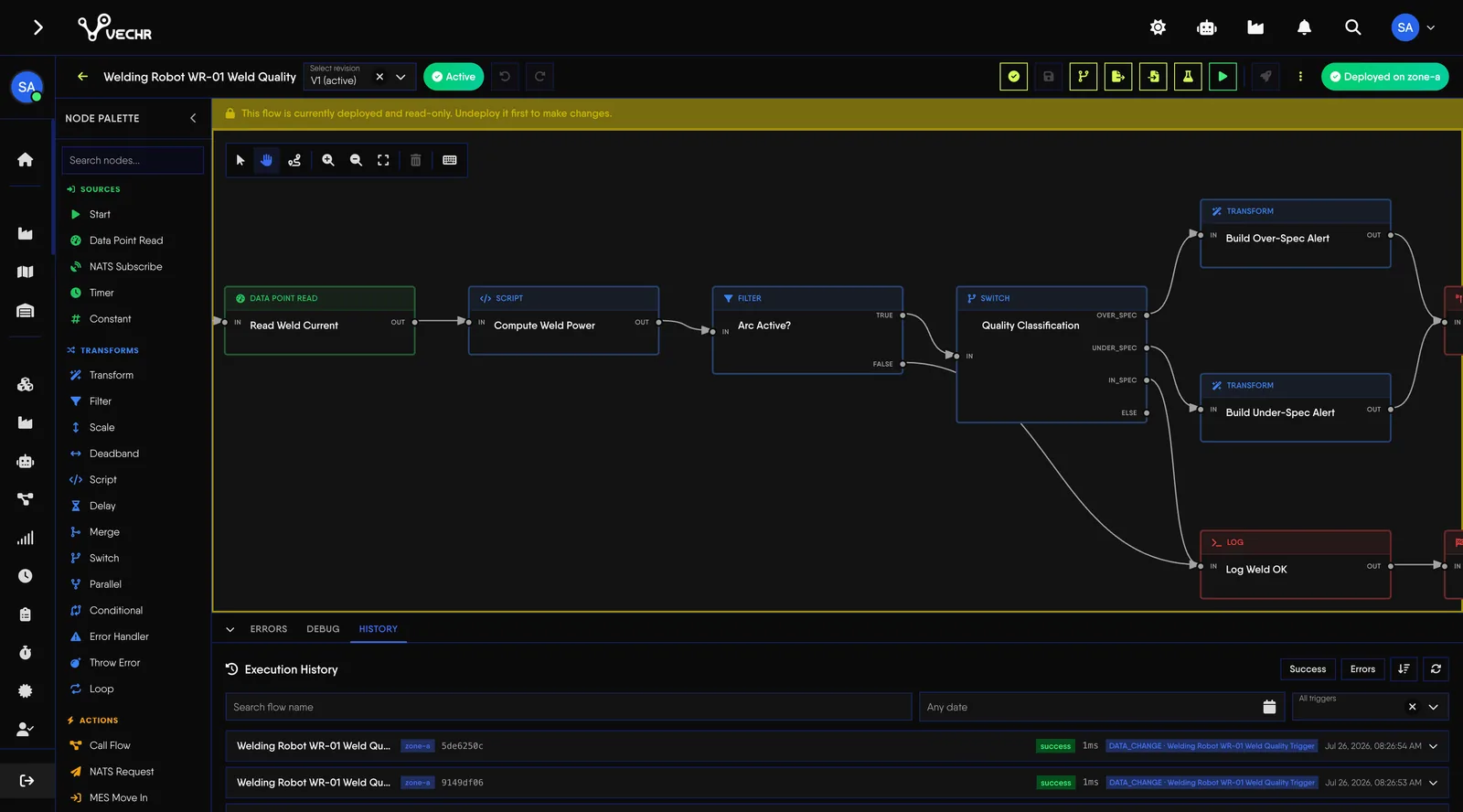
Connect machine events to MES transactions by wiring nodes on a canvas. Nothing reaches production without a deliberate deployment.
Today Every machine integration is custom code.
With VECHR MES Flows are built visually from ready nodes.
Today A change goes live the moment it is saved.
With VECHR MES Draft, validate, simulate, then deploy on purpose.
Today One failure stops automation plant-wide.
With VECHR MES Flows run per zone, each with its own failover.
What Process Orchestrator covers
- High availability from the start Flows run on redundant pods with automatic failover across zones, so automation keeps running when one node has a problem.
- Visual, low-code flow builder Build automation on a drag-and-drop canvas using 50+ node types and native MES actions, with no code required for common needs.
- Event-driven triggers Flows can run manually, on a schedule, when a data value changes, or as a before/after hook inside a Specification, following how your production actually runs.
- Extend with the TypeScript Plugin SDK For more specific needs, build custom nodes in TypeScript via @vechr/orchestrator-sdk without modifying the core system. Claude AI-powered plugins can also be used to extend what a flow can do.
- Zero-downtime plugin updates Plugin updates can be distributed across every pod without stopping flows in progress. Executions already under way finish on the old version, while new executions use the latest.
- Structured, localized configuration Every node has a typed, translatable configuration form rather than raw JSON, with special protection for sensitive fields such as passwords.
- Safe deployment control Every flow passes through Draft, Validate, Simulate, and Deploy, so a flow never runs in production merely because a configuration changed.
- Built-in observability and tracing Watch the health of each zone, execution metrics, and detailed step traces, so a flow can be understood and debugged without guessing at what happened.
Nothing reaches production by accident
A flow does not start running just because it has been finished. Every flow passes through four stages, and deployment to production is always a deliberate act.
| Stage | What it means |
|---|---|
| Draft | The flow is still editable and is not running in any environment. This is the starting state for every new flow. |
| Validate | The flow's structure is checked for problems before it is run. |
| Simulate | The flow runs against sample input to check every step without touching production data. |
| Deploy | A deliberate deployment. Only at this stage does the flow start running against the production process. |
Plugin updates are distributed across every pod without stopping executions in progress. Runs already under way finish on the previous version.
Every business event can start a flow
A flow can start on a cron or interval schedule, when a data point changes, or when something happens in the MES.
| Source | Events |
|---|---|
| Production record | All 11 transaction types. |
| Resource state | Changed, recorded, closed, acknowledged. |
| Unit tracking | Unit created, unit status changed. |
| Production order | Status changed, created, updated, deleted. |
| Production stock | Received, updated, adjusted, state changed, deleted. |
| Labour session | Clocked on, clocked off, activity switched. |
| Pallet | Created, closed, voided. |
A BEFORE trigger can veto the operation, and it fails closed on timeout. A COMPLETED trigger is fire-and-forget. The payload carries a readable name next to every ID, and every quantity in each unit the material converts to.
Around 51 built-in nodes, in six categories
| Category | Examples |
|---|---|
| Source | Timer, data point read, message subscribe, manual input, constant. |
| Transform | Filter, scale, deadband, script, switch, loop, parallel, error handler. |
| Action | MES transactions, notification, master data lookup, call flow, resource state, certification check, unit conversion, pallets, scheduling slots. |
| Integration | REST request, send email. |
| Database | SQL Server, PostgreSQL, MySQL. |
| Destination | Message publish, data point write, log, end. |
Failures are handled on purpose. Each node has an error port, an Error Handler node catches failures, and you decide whether a handled failure still counts the run as failed. Flows keep revisions, separate the deployed revision from the active one, and can have collaborators.
Run per zone, not just per plant
- Execution scoped per zone Flows run in a defined zone, so automation can sit close to the process that needs it, including in large plants and multi-site environments.
- Automatic failover Flows run on redundant pods and can fail over when one node has a problem, targeting a failover of around 30 seconds.
- Drafted by AI, confirmed by a person Describe the automation in plain language and the AI assistant can draft a flow by wiring up the nodes it needs. A person still reviews it before the flow is deployed.
- Observable down to every step Zone health, execution metrics, and step-by-step traces are available to help find problems without inferring them from the end result.
- An Edge Agent collects on site Machine data is collected by an Edge Agent inside the plant, not by the cloud. A plant can run several, one per machine, cell or line.
- Keeps collecting when the link drops Every sample is written to a local historian first. Configuration and flows are cached, so even a restart during an outage comes back collecting.
- No trigger lost to an outage A flow that needs the cloud is queued at the plant and delivered in order when the link returns. The cloud runs it exactly once, backdated to when it fired.
- Enrolled with an administrator's approval The agent announces itself and an administrator approves it. No credential is ever typed onto the box.
Frequently Asked Questions
What automation teams usually ask before trusting a production process to a flow.
Can an unfinished flow affect production?
No. A flow only runs after a deliberate deployment, and it passes validation and simulation first. Setting a status to Active on its own does not make a flow run in production.
Do we need a developer to build a flow?
For normal needs, no. Flows can be built on a drag-and-drop canvas with 50+ node types and native MES actions. Where you need specific behaviour, the TypeScript Plugin SDK allows custom nodes without modifying the core system.
What happens to a running flow when a plugin is updated?
Executions already running finish on the previous plugin version. New executions use the latest one, so an update needs no downtime and no process switches version mid-execution.