Design recipes and routings visually in your MES, with versions under control
A routing turns a production order into a sequence of steps that can genuinely be run on the shop floor. Build the process visually, use specifications as its basis, and manage every change with version control without disrupting orders already in flight.
Draw the process on a canvas: sequential, parallel and rework paths. New versions never disturb the orders already running.
Today Routings live in documents nobody updates.
With VECHR MES Routings are drawn visually and run exactly as drawn.
Today A process change breaks orders in flight.
With VECHR MES Running orders keep their version. New orders take the new one.
Today Rework is handled off the record.
With VECHR MES Pass and fail branches are part of the routing.
What you can design
- Process Specification (Master Recipe) Define how a product is made, from process steps and parameters to the resources required and the quality checks. A specification becomes a reusable reference across many production orders.
- Visual Routing Designer Build the production flow directly on a canvas with drag-and-drop. Create sequential steps, branches, parallel processes, conditions, and rework loops without writing code.
- Material & Multi-Level BOM Manage raw materials, components, and sub-assemblies in a multi-level BOM (Bill of Materials) structure, versions and revisions included, so production always uses the right materials and structure.
- FEFO & FIFO Decide how material is allocated to production using FEFO (First Expired, First Out) or FIFO (First In, First Out). The system helps ensure the right lot is used under the applicable rule and keeps expired material out of production.
- Lot Size Mode on the material Fixed, Order Qty or Any. The mode drives how units are generated, and whether an order can be split into lots that move through the routing independently.
Sequential, parallel, and conditional in one routing
Real production processes do not always run in a straight line. A job can branch, several steps can run at once, and an inspection result can decide whether a unit moves on or goes back for rework. All of it can be modelled on one canvas.
| Step | How it behaves |
|---|---|
| 10 · Material preparation | Sequential: the next process starts once preparation is complete. |
| 20 · Sub-assembly A | Runs as one branch of the process. |
| 30 · Sub-assembly B | Runs in parallel with step 20, and both must finish before the process continues. |
| 40 · Final assembly | Rejoins the output of the two parallel paths. |
| 50 · Functional test | The test result determines the next path. |
| 60 · Pack & ship | Units with a PASS result continue. Units with a FAIL result return to step 40 for rework. |
Branches are decided by the conditions that actually occur during execution. The routing defines the rules and the possible paths, while the final decision follows the real result on the shop floor.
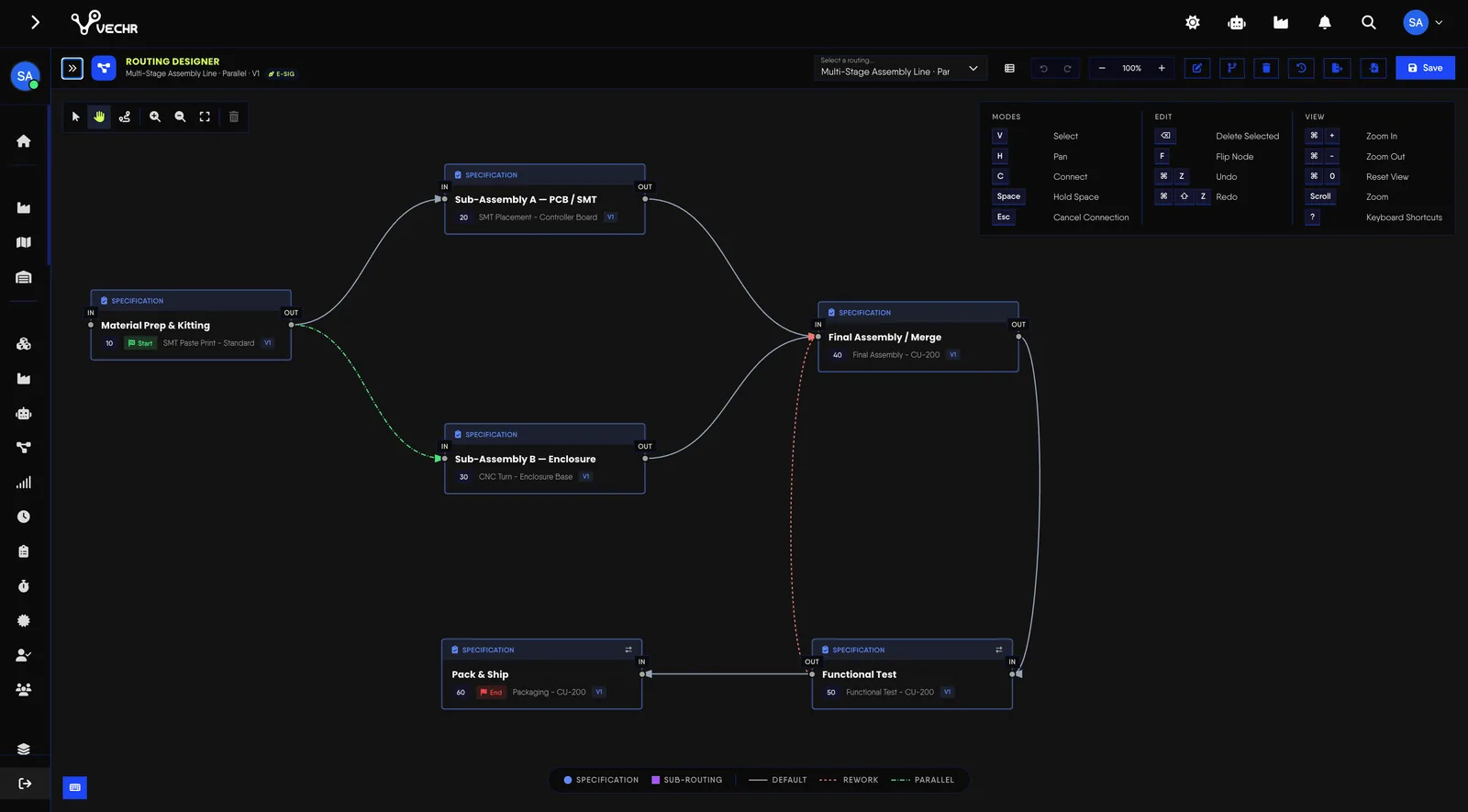
A canvas that stays readable as the routing grows
- Tidy up in one click Arrange the routing, or a selection, left to right or top to bottom at a chosen spacing. Or re-route only the lines that cut through steps, without moving anything.
- Lines go where you want them Flip a step to mirror its ports, drag bend points onto a path to route it around other steps, and choose smooth or right-angle lines per routing.
- Conditions written as expressions Each connection can carry a JEXL expression, with an inline tester to try it before saving. Alternative and Rework paths are chosen by expression and priority.
- One unit, one step A unit is always at exactly one routing step, so its position is never ambiguous.
Version control without disrupting orders in flight
- Every change becomes a new version When a routing is updated, orders already released keep running on the previous version. The change applies to subsequent executions.
- Specifications are reusable One specification can underpin many routings, complete with its operations, qualified resources, standard times, work instructions, and quality checks.
- AI helps draft it Describe the process you want in plain language and the AI Routing Designer produces a draft routing for review. Nothing is saved or used until a person confirms it.
Frequently Asked Questions
The questions that usually come up as process and IT teams start designing routings.
What MES features support flexible recipe and routing control?
In VECHR MES, three features work together. A process specification (master recipe) holds the steps, parameters, qualified resources, standard times, work instructions and quality checks. The visual Routing Designer turns it into sequential, parallel, conditional and rework paths without code. The multi-level BOM keeps materials and sub-assemblies under versions and revisions. One specification can underpin many routings, so a process change is made once.
How does an MES simplify change management for routings?
Every routing change is saved as a new version. Orders already released keep running on the version assigned to them, and the new version applies to subsequent orders, so a change never lands halfway through a run. Teams can also describe a change in plain language and let the AI Routing Designer draft it, but nothing is saved or used until a person confirms it.
Can a routing branch on an operator's decision?
Yes. Operators record a result at a conditional step, and the system determines the next path from it. A PASS continues to the next process, while a FAIL sends the unit to rework.
What happens to orders already running when a routing changes?
Orders already released keep using the routing version assigned to them. The change is created as a new version and used for subsequent orders.
Do we need an engineer to create a routing?
Not necessarily. Routings can be built on a visual canvas with drag-and-drop. AI can also draft one from a plain-language description of the process, and that draft is then reviewed and confirmed before use.