Finite-capacity scheduling that understands machines, tanks, and pumps
More than a production calendar. The scheduler understands the character of each resource: machine cycle times, tank capacity and hold times, pump flow rates. It then builds a schedule around the constraints that genuinely exist on the shop floor.
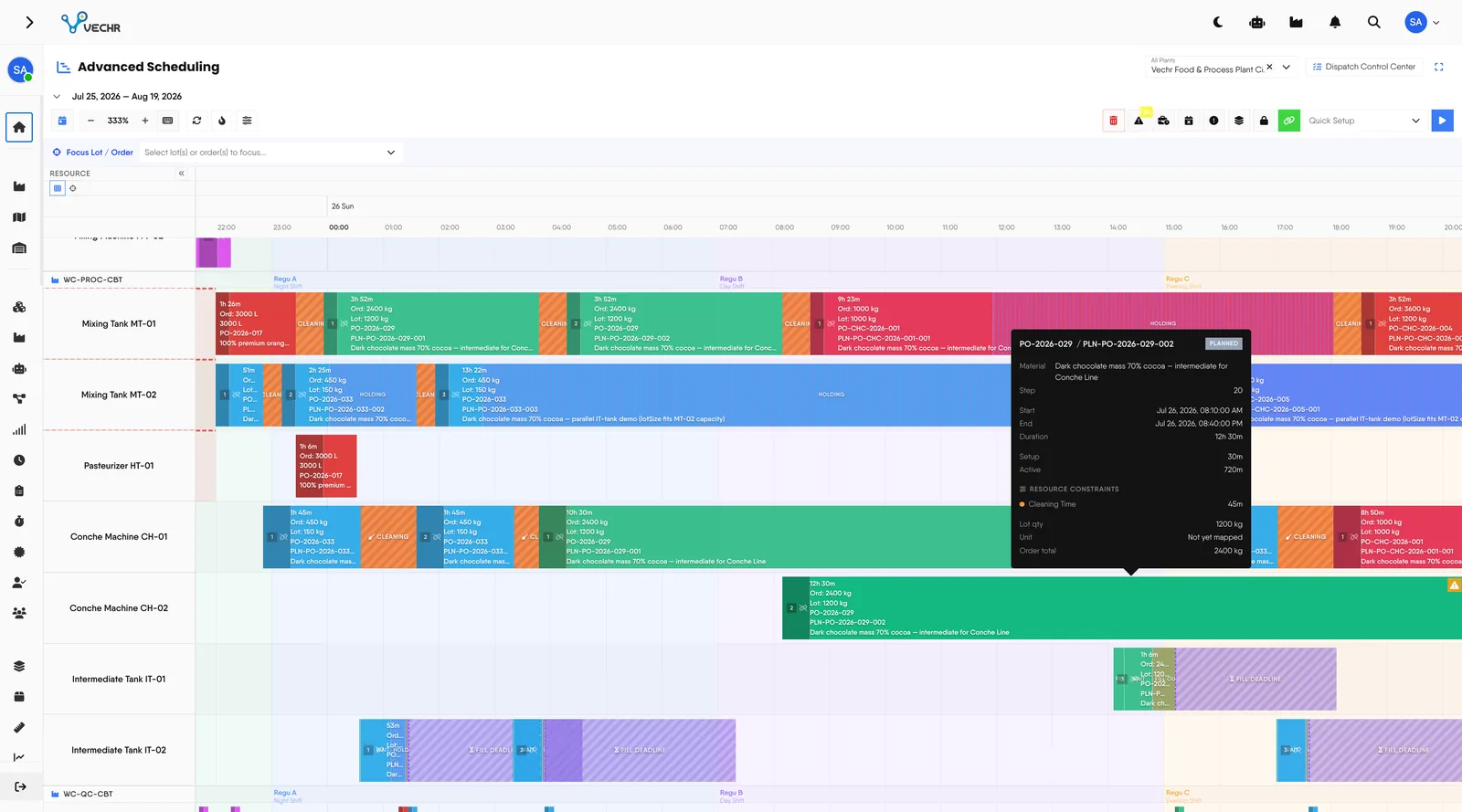
Finite-capacity scheduling that knows a tank is not a machine. Cleaning, hold times, pump rates and labour are built into every plan.
Today The schedule ignores cleaning and hold times.
With VECHR MES Cleaning, cooldown and hold times are real constraints.
Today Tanks and pumps are planned like machines.
With VECHR MES Tank volume and pump flow drive the timing.
Today Bottlenecks are found after the fact.
With VECHR MES Forward, backward, leveling and Drum-Buffer-Rope protect them.
What scheduling covers
- Four scheduling strategies in one engine Use Forward to finish work as soon as possible, Backward to hit a due date just-in-time, Leveling to balance load, or Drum-Buffer-Rope to protect throughput around a bottleneck.
- Built for discrete and process manufacturing The scheduler understands different constraints for machines, tanks, and pumps, including capacity, minimum and maximum hold times, cleaning, cooldown, and maintenance windows.
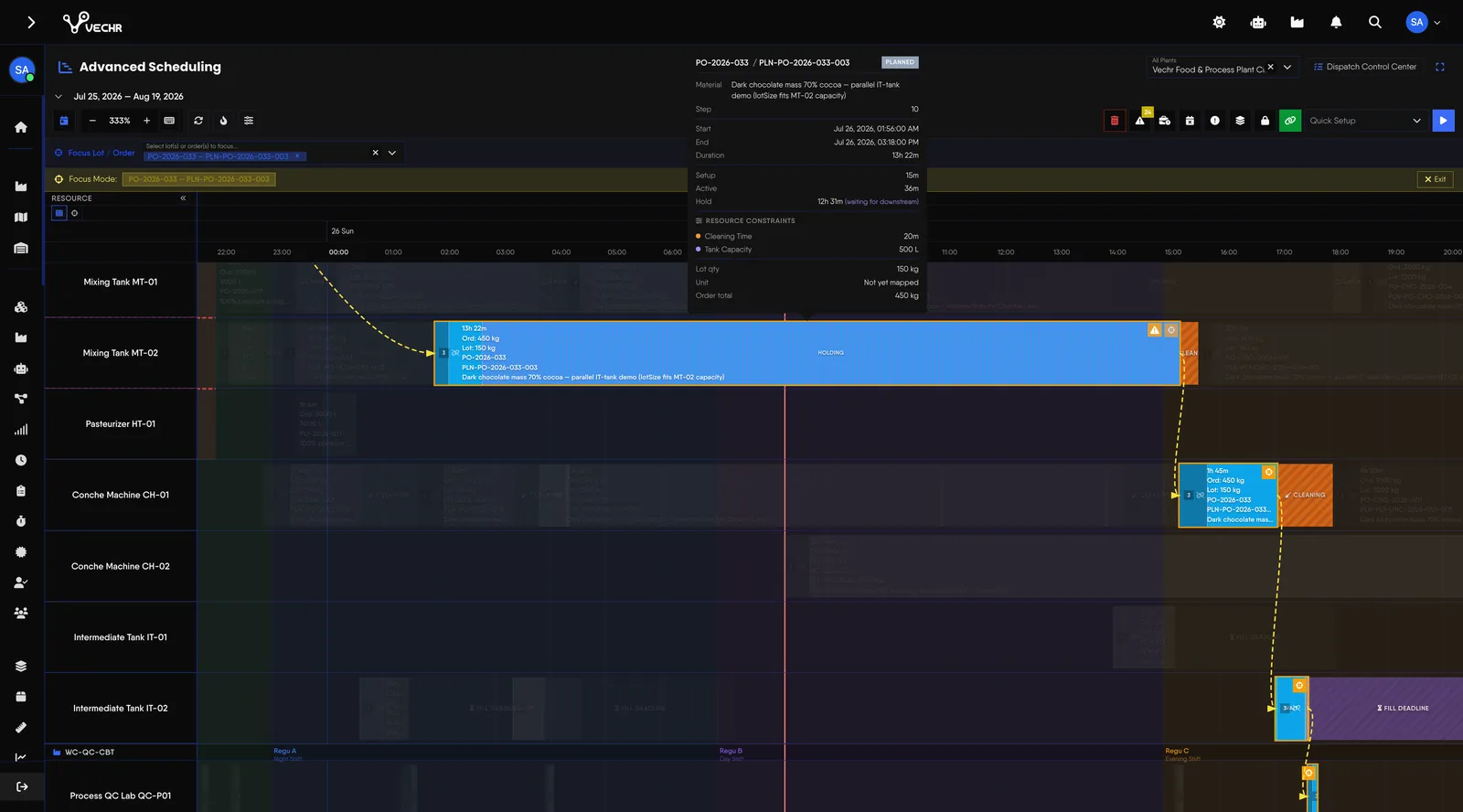
- Lot pipelining to raise throughput One order can be split into lots that flow independently and overlap across processes, so work does not have to wait for the whole order to finish before the next process starts.
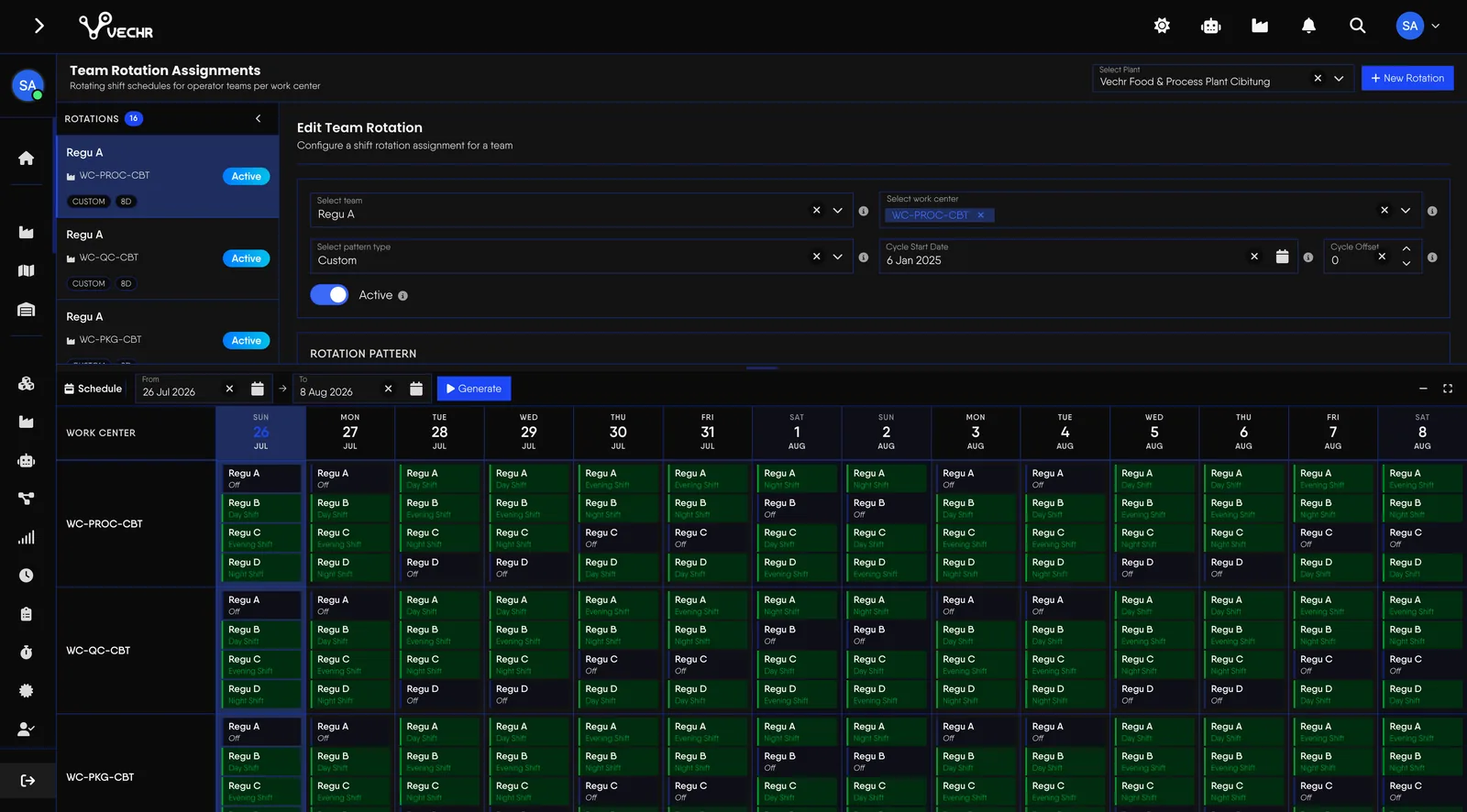
- Workforce capacity taken into account Schedules use shift patterns from DuPont and Panama to custom rotations, and treat labour availability as a constraint. Named operator assignment is covered on the Workforce & Labour page.
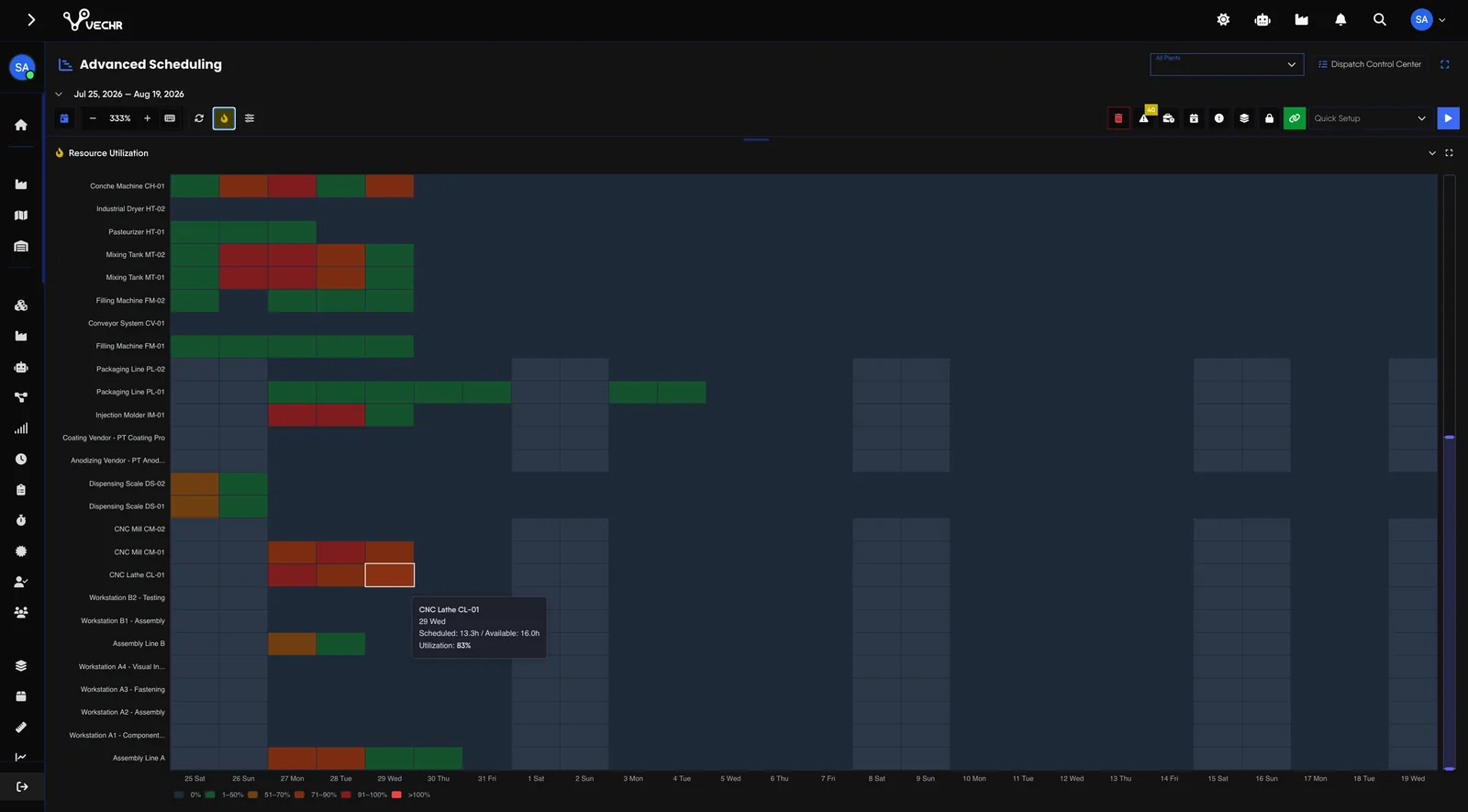
- An interactive Gantt to control the schedule Reschedule with drag-and-drop, lock the slots that matter, apply changes in bulk, see resource utilization, and spot material shortages or late-order risk early.
- A Dispatch Queue for the floor Releasing an order pushes its first scheduled steps into the Dispatch Queue, where released work is grouped for the floor.
- Machine stops reach the plan at once A breakdown raised on the floor appears as a banner on the Gantt with the orders it lands on. Reschedule affected orders waits for the machine or moves steps to a sister machine in the same resource group.
- Capacity insights that work like an inbox The scheduler flags material, labour and machine shortages from its own figures. Each planner can mark them read, acknowledge or clear them, and an insight comes back if it gets worse.
Every resource has its own behaviour and constraints
Machines, tanks, and pumps cannot be treated with the same formula. The scheduler computes duration from the character of the resource in use, rather than from a duration figure typed in by hand.
| Resource type | How duration is determined |
|---|---|
| Machine | Setup time plus cycle time multiplied by the production quantity. |
| Tank | Based on volume and hold time. If the volume exceeds capacity, the scheduler can allocate to the next tank while respecting the available piping connections. |
| Pump | Based on volume divided by flow rate. Transfer duration is computed from the pump's flow capacity rather than entered manually. |
Per-resource constraints can include tank capacity, minimum and maximum hold time, cleaning, cooldown, maintenance windows, and pump rates for both inbound and outbound transfers.
Tank occupancy is counted from start to finish
An intermediate tank is in use from the moment filling starts until its entire contents have been moved out. Counting only the dwell time can make a schedule look free when the tank is still tied up by a running process.
| Phase | Duration | Example at 1000 kg |
|---|---|---|
| Fill in | Lot volume ÷ pump rate in | 1000 L ÷ 100 L/min = 10 minutes, and can overlap with the pump-out of the preceding process |
| Wait | Minimum hold time | 30 minutes, no overlap |
| Fill out | Lot volume ÷ pump rate out | 1000 L ÷ 50 L/min = 20 minutes, and can overlap with the downstream process |
| Total occupancy | — | 60 minutes, not just the 30 minutes of hold time |
Changeovers depend on what ran before
Switching from one product to another rarely takes a fixed time. The Changeover Matrix stores the setup time between two specific products, and the scheduler sequences work with it.
- Sequence-dependent setup Setup time is looked up per product pair, so the order of jobs changes the total setup time.
- Cleaning is not counted twice The changeover time is the total. If the resource already has a cleaning gap, that gap is netted out, so a 90-minute changeover on a tank with 30 minutes of cleaning still takes 90 minutes.
- Equipment that runs several jobs at once An assembly bench, a test rack or a curing chamber gets a Concurrent Capacity per material on its Standard Rate. Jobs stack up to that limit, and a step turned away by a full machine is reported as such.
- Priority-driven sequencing Orders are sequenced by priority and due date, with Custom Priority Scoring per work center for finer control.
Decide which limits are hard and which are advisory
Each capacity type can be enforced or only reported. The choice lives in Settings, under Capacity Enforcement.
| Setting | Default | When it is off |
|---|---|---|
| Enforce Material | Off | Schedule anyway and report the shortfall. |
| Enforce Labor | Off | Schedule into thin shifts and report the shortfall. |
| Enforce Resource Horizon | On | Search past the window and report the overrun. |
Machine capacity, tank volume and the fill, cleaning and cooldown rules are always enforced. These settings never relax them.
Change the plan without disturbing what is already running
- Clear with a preview Clear the whole schedule or only selected orders, and see what will be removed first.
- Running lots stay where they are Lots already in production are kept as they stand by both Clear and Reschedule.
- Bind planned lots to real units AS Lot Mapping links placeholder lots such as PO-1001-LOT-001 to the physical units, with a Quick Setup path.
- Adjust by hand when you need to Move a slot manually, apply an action to several slots at once, and review warnings and conflicts in one panel.
Four strategies, one engine
- Forward Schedules work as early as possible from the available start date. That is the right choice when the goal is to finish production sooner.
- Backward Works the schedule backward from the due date, so material and resources are not committed earlier than they need to be.
- Leveling Distributes workload across available resources so capacity does not pile up on one resource while others sit idle.
- Drum-Buffer-Rope Identifies the constraint resource and protects the flow of production around it, so the bottleneck does not throttle overall throughput.
Frequently Asked Questions
What planners usually want settled before trusting their production schedule to a system.
Does this scheduler handle process manufacturing, or only discrete?
Both. Machines, tanks, pumps, capacity, hold times, and piping topology can all act as scheduling constraints directly, so process manufacturing does not have to be treated as an exception.
Do we have to identify the bottleneck first?
No. With Drum-Buffer-Rope, the scheduler can identify the constraint resource itself and build the schedule to protect throughput around it.
Are cleaning and cooldown taken into account?
Yes. Cleaning, cooldown, maintenance windows, working calendars, and labour availability can all form part of a resource's constraints, so the schedule reflects real operating conditions more closely.