Plan who runs each step, then record the hours actually worked
Machines are only half of a schedule. VECHR MES assigns a certified operator to every scheduled step, adjusts when someone calls in sick, and records actual hours that payroll can approve.
An operator on every scheduled step, cover proposed when someone is absent, and actual hours that payroll can approve and export.
Today Who runs which step is decided on a whiteboard.
With VECHR MES Every scheduled step has a certified operator.
Today A sick call means re-planning the shift by hand.
With VECHR MES Unstarted steps are released and cover is proposed.
Today Hours come from paper timesheets.
With VECHR MES Approved hours export to payroll or ERP.
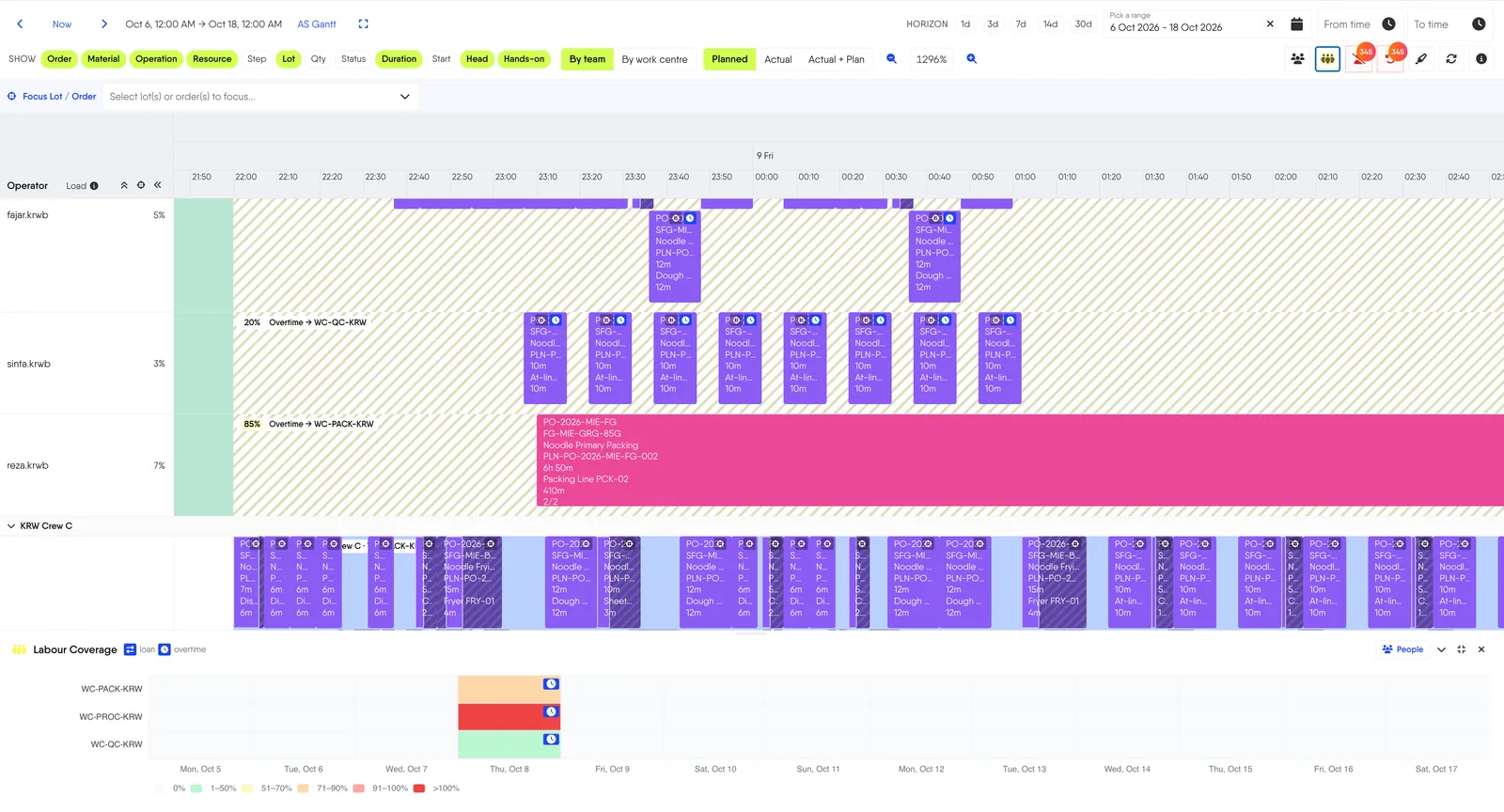
Labour Schedule puts an operator on every step
Advanced Scheduling decides when a step runs and on which machine. Labour Schedule decides who runs it. Both work on the same Gantt.
- Auto-assignment that follows the rules The least-loaded operator gets the step first. Anyone without the required certification, on leave, or already booked at that time is skipped.
- The planner has the final say Drag a step onto another operator to pin it. The suggestion never overrides a pinned assignment.
- Borrow before paying overtime When a crew is full, the suggestion borrows a free, certified operator on shift in another team of the same plant. Only then does it fall back to overtime from the adjacent shift, capped per person.
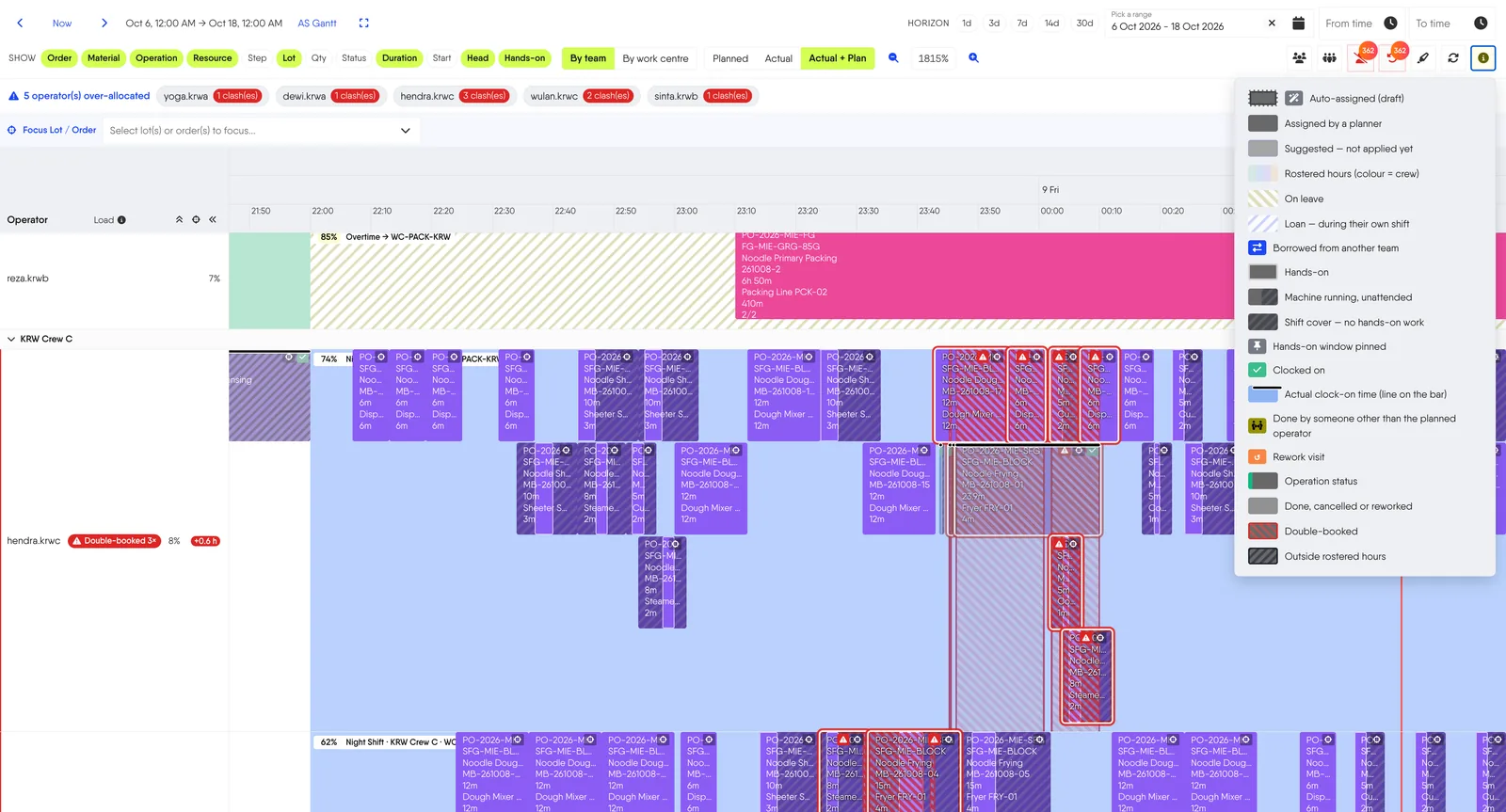
- Loans and overtime are marked on the bar Hours inside the operator's own shift count as a loan, hours outside it as overtime, and a rest day as a call-in. Every proposal can be unticked or re-picked before Apply.
- A shift change splits the step A step that runs across a crew change is split into ownership segments, so each crew owns the part it actually works.
- The hands-on window stays put Labor Time Position locks the operator's hands-on time to the start or end of the operation, instead of letting it drift.
Labour Schedule is part of the Advanced Scheduling module.
Labour Coverage shows a thin crew before the shift starts
A heatmap under the Gantt compares the people needed at the peak with the hours across the shift, per work center and per day.
- Drill down to the roster Open a cell to see who is rostered, then jump straight to the open heads at that work center.
- Correct across several plants Rows are grouped by the work center's own plant, so a multi-plant view never merges or splits a cell.
- Conflicts flagged by name Double-booked operators and hours outside the roster are marked on the bar, with the number of clashes per person.
Sudden leave does not mean re-planning by hand
User Availability records annual leave, sickness, unpaid leave and other absence. Entries come in by hand or through an HR sync, and the scheduler never assigns someone who is away.
- Unstarted steps are released Recording sudden leave releases that person's steps that have not started yet.
- Find replacements proposes cover Labour Schedule proposes cover for exactly those released steps, with the same certification and booking rules.
- Started work goes to a handover list Steps already in progress are listed for the floor, so a supervisor can hand them over in person.
Team Rotations give the scheduler a real roster
Shift-pattern rotations are set per team and per work center. A coverage report shows where the roster leaves gaps.
- Common patterns or your own DuPont, Panama, Pitman, or a custom rotation.
- A plant rotation replaces the global one When a plant defines its own rotation, it replaces the Global one instead of adding to it. Labour capacity is never counted twice.
- Calendar events still apply National holidays and plant shutdowns block time on top of the rotation.
Labour Tracking records the hours actually worked
Labour Tracking records actual operator hours by person, job and activity. VECHR MES stores the hours. Your payroll or ERP still calculates the pay.
| Capture mode | How a session starts and ends |
|---|---|
| None | No hours are recorded. |
| Derived | Move In opens a session. Move Out, a whole-lot Scrap, a Merge of the source lot or a Rework closes it. |
| Explicit | Operators run their own clock, from the terminal or a badge reader. |
Capture mode is set per plant.
Hours that payroll can trust
- One running clock per operator The database allows one open session per person. Starting anything ends whatever was running, so the same minute is never booked twice.
- Duration and Allocated, side by side Duration is the raw wall clock and is never adjusted. Allocated is the share after concurrent work is divided, and it is the figure payroll uses. Both are exported.
- Dwell time is not billed as attended work Automatically captured sessions are capped at the attended labour time in the Specification. A lot sitting in a tank does not count as hands-on work.
- Direct and indirect time in one pool Run, Setup, Changeover and Rework book against a production order. Cleaning, Waiting, Meeting, Training and Maintenance Assist are paid time with no order.
- Forgotten clock-offs are closed for review A session left open is closed at the operator's rostered shift end, flagged with the reason, and sent to the supervisor.
- Cover is recorded, not blocked Starting a lot planned for someone else asks for confirmation first. The session records the cover as a mismatch for the supervisor.
Approval is the gate before payroll
Every session moves from OPEN to CLOSED, APPROVED and EXPORTED, or ends REJECTED. Approved and exported hours are locked.
- A screen built for supervisors A Dashboard with who is clocked on right now, KPI tiles and trend charts, plus Records and Approvals.
- Bulk actions that preview first A bulk approval shows what it covers, calls out auto-closed sessions, and refuses an oversized set rather than applying part of it.
- Export for payroll or ERP CSV export over the full filtered set, with an ERP activity code per activity.
- Clocking someone else is its own permission Badge readers and supervisor entry both work, and the record still shows who did the clocking.
- Badges and machines can drive the clock Process Orchestrator has Labour Clock On, Labour Clock Off and Labour Switch Activity nodes, so a badge scan or an equipment signal can start and stop a session.
Labour Capacity checks whether the plan fits your crew
One report compares three figures for the same period.
| Figure | Where it comes from |
|---|---|
| Rostered | Team Rotations: who is on shift. |
| Planned | Advanced Scheduling: the labour the schedule needs. |
| Actual | Labour Tracking: the hours captured on the floor. |
Group the report by work center, team, shift, operator, order or operation. Labour Schedule comes with the Advanced Scheduling module and Labour Tracking is a module of its own. Both are available on the Enterprise tier.
Frequently Asked Questions
What planners, supervisors and HR usually ask before trusting labour data to the MES.
Does VECHR MES calculate pay or incentives?
No. It records actual hours by person, job and activity, then exports them. Your payroll or ERP system calculates the pay.
What happens when an operator calls in sick?
Record the absence in User Availability. Their steps that have not started are released, and Find replacements proposes cover for exactly those steps. Steps already in progress are listed for a floor handover.
Can we borrow an operator from another team?
Yes, within the same plant. The suggestion borrows a free, certified operator who is on shift in another team. Hours inside their own shift count as a loan and hours outside it as overtime, capped per person. Loans can be switched off per scheduling run.
What if an operator forgets to clock off?
The session is closed at their rostered shift end, flagged with the reason, and sent to the supervisor for review before approval.
Is the planned operator enforced on the floor?
No. Starting a lot planned for someone else asks for confirmation and never blocks. The session is recorded as a mismatch so the supervisor can see it.